Saving & Managing Words
Save the words you look up, together with the sentence you found them in, and review, search or export them in the Vocabulary tab.
Save a word
- In the reader, tap a word. The lookup sheet opens.
- In the lookup sheet, tap Save to Vocabulary (the bookmark icon) next to the word.
Mekuru confirms that the word is saved, and the button turns into a check mark.
Mekuru saves:
- the word and its reading
- its definitions
- the sentence you found it in
- the date you saved it
In manga, the sentence comes from the page's OCR text (the text read from the page image). You can also save words from search results in the Dictionary tab; those have no sentence.
You can save each word and reading once. If it is already in your list, the button shows a check mark (Already in vocab list). Tapping it then shows Word already exists in vocab list.
Fix the sentence before saving (manga)
OCR can misread a line. In the manga reader you can correct the sentence before you save:
- In the lookup sheet, open the Sentence tab.
- Tap Edit sentence and correct the text.
- Go back to the Dictionary tab and tap Save to Vocabulary.
The corrected sentence is saved with the word.
Review your words
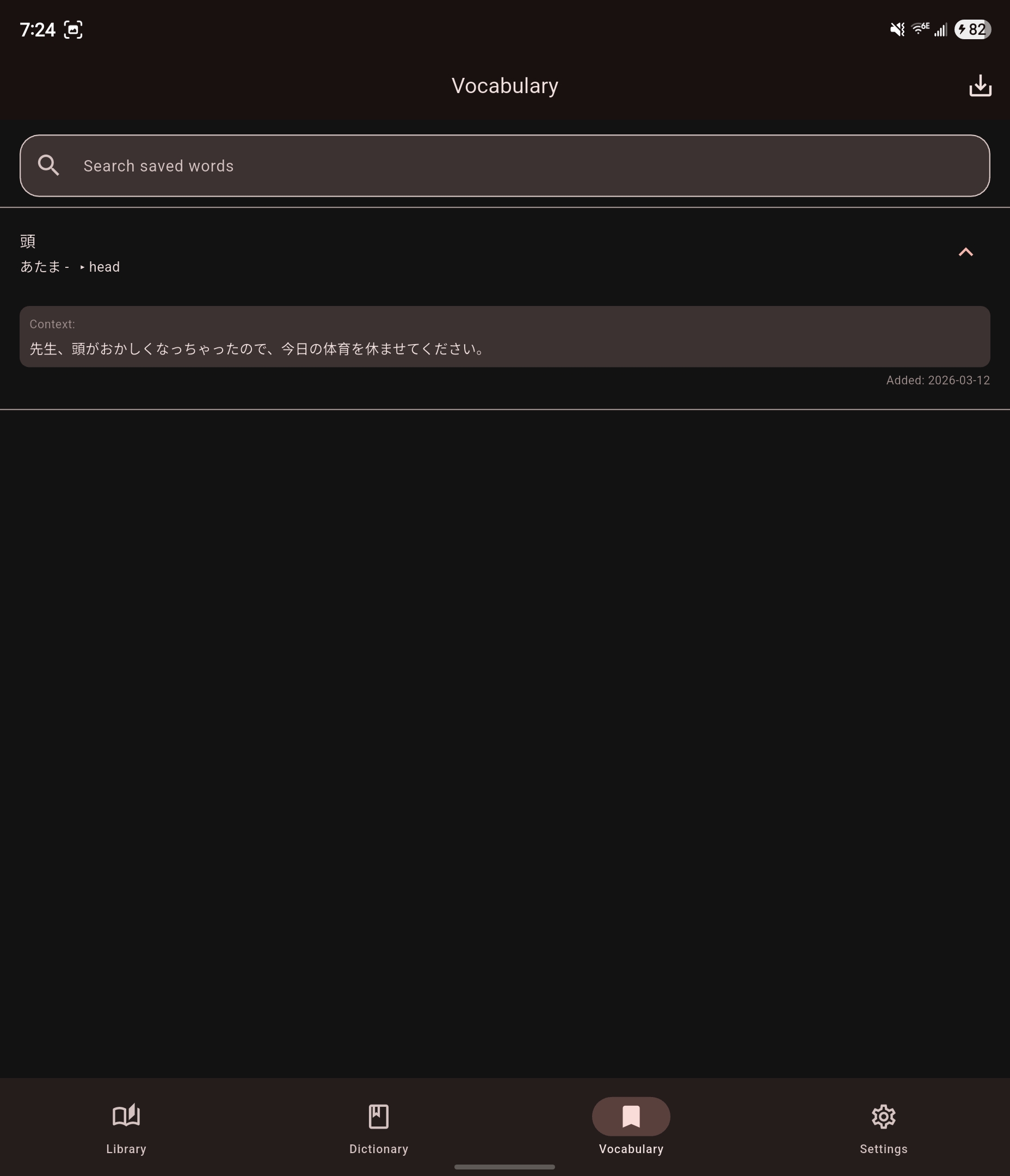
Open the Vocabulary tab. Your newest words are at the top. Each entry shows the word, its reading and its first definition.
Tap an entry to expand it. You see:
- the other definitions
- the saved sentence, under Context:
- the date you saved it, after Added:
Search your words
Type in Search saved words at the top of the Vocabulary tab. The list shows the words whose word, reading, definitions or saved sentence contain your search.
To see every word again, tap Clear search (the X in the search field).
Delete a word
Swipe the entry from right to left. To bring it back, tap Undo in the message that appears.
Export as CSV
A CSV file is a plain text table. Anki and spreadsheet apps can import it.
- In the Vocabulary tab, tap Export CSV (the download icon at the top).
- Tap the words you want, or tap Select all. After a search, Select all selects only the words you found.
- Tap Export selected.
- Choose a folder and save the file. Its name is
vocabulary_export_followed by the date.
Once the file is saved, Mekuru says so and leaves selection mode. To leave selection mode without exporting, tap Close (the X).
On iPhone and iPad
The Files picker opens for step 4. Choose a folder, for example in iCloud Drive or On My iPhone, and confirm.
The first row of the file names the columns:
| Column | Contains |
|---|---|
| Word | The saved word |
| Reading | Its reading in kana |
| Meaning | The definitions, separated by semicolons |
| Furigana | The word with its reading in Anki's furigana format, for example 食[た]べる |
| Context | The saved sentence |
Related pages
- Looking Up Words
- Exporting to Anki: send a word straight to Anki from the lookup sheet.
- Reading Stats: saved words count toward Words added and Vocabulary growth.
- Backup & Restore: backups include your saved words.