Furigana
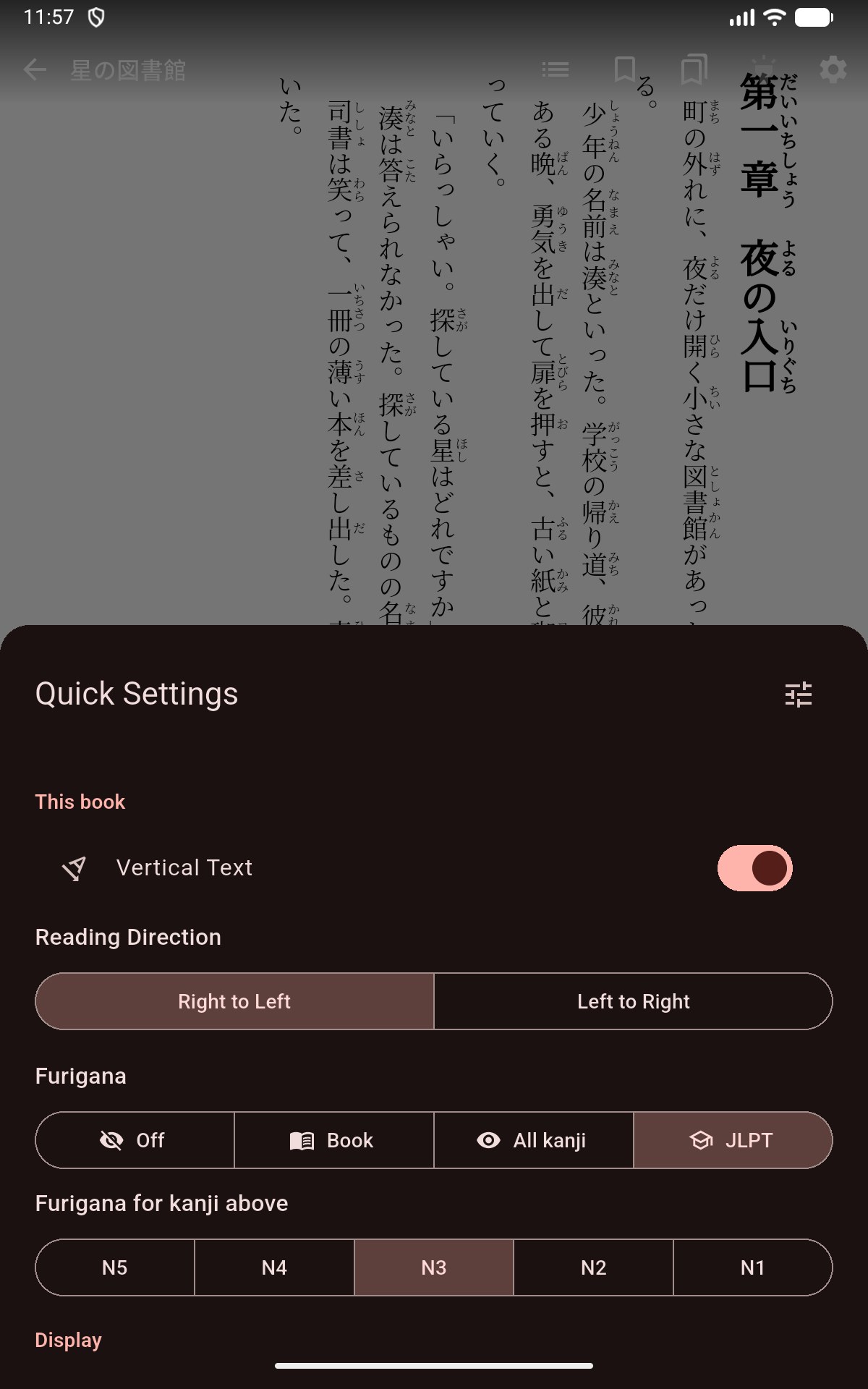
Choose which kanji show furigana (small kana above kanji that show how to read them) while you read an EPUB book.
Before you start
- Furigana settings work in EPUB books. The manga reader does not add furigana.
- For WaniKani mode you need a WaniKani account.
Pick a furigana mode
- While reading, tap an empty spot in the middle of the page to show the controls.
- Tap Settings (gear icon).
- Under This book, tap Furigana.
- Pick a mode.
Mekuru remembers the mode for each book.
| Mode | What you see |
|---|---|
| Off | No furigana at all, not even the furigana printed in the book |
| Book | Only the furigana that came with the book. This is the default. |
| All kanji | The book's furigana, plus furigana that Mekuru adds to every other word with kanji |
| JLPT | Furigana only on words with kanji above the JLPT level you pick |
| WaniKani | Furigana only on words with kanji you have not learned on WaniKani yet |
Use JLPT mode
The JLPT (Japanese-Language Proficiency Test) has five levels, from N5 (easiest) to N1 (hardest).
- Pick JLPT as the furigana mode.
- Under Furigana for kanji above, tap the level you know: N5, N4, N3, N2 or N1. The default is N3.
Words made only of kanji at your level or easier show no furigana. If a word has even one harder kanji, the whole word keeps its furigana. Kanji that are not on any JLPT list always get furigana.
The level you pick applies to all books.
Use WaniKani mode
Connect your WaniKani account
- Go to You › Settings › WaniKani. In the reader you can also pick WaniKani and tap Link your WaniKani account.
- Tap Get an API token. The WaniKani website opens.
- Create a token there. A read-only token is enough.
- Copy the token and go back to Mekuru.
- Paste it into API token.
- Tap Link account.
Mekuru downloads the SRS stage of every kanji you have studied. (SRS stages are WaniKani's learning stages, from Apprentice to Burned.) The screen then shows your level, how many kanji were synced and when.
Mekuru updates the list when you open the app, at most once an hour. To update it now, tap Sync now.
Choose which kanji count as known
- In the reader, pick WaniKani as the furigana mode.
- Tap Hide furigana at.
- Pick Apprentice and up, Guru and up, Master and up, Enlightened and up or Burned. The default is Burned.
A word keeps its furigana if any of its kanji is below that stage or is not in your WaniKani list yet. This choice applies to all books.
Disconnect WaniKani
On the WaniKani screen, tap Unlink. Mekuru forgets the token and the kanji list.
Furigana that the book already has
In JLPT and WaniKani modes, the same rule applies to the furigana printed in the book. The book's furigana on words you know is hidden. Pick Book to see all of it again.
Get more accurate readings
Mekuru works out the readings with its built-in word analyzer. For better readings, install the Enhanced Furigana Dictionary from You › Settings › Downloads. It is a 45 MB download and takes about 250 MB on your device.
It also helps Mekuru find the right word when you tap. It does not turn furigana on or off. See Install the Enhanced Furigana Dictionary.
Export a book with furigana
You can make a copy of a book with furigana built in, to read in other apps. See Furigana EPUB Export.
If something goes wrong
- "WaniKani rejected this token. Create a new one and try again." Make a new token on the WaniKani website and paste it again.
- "Couldn't reach WaniKani. Check your connection." Check that you are online, then tap Sync now.
- "WaniKani is rate limiting requests. Try again in a minute." Wait a minute, then tap Sync now.
- "Kanji list restored from a backup. Link again to keep it updated." A backup brings back the kanji list but not the token. Paste your token again.
- Tapping words stops working after you install the Enhanced Furigana Dictionary. In You › Settings › Downloads, turn off Use enhanced dictionary and restart Mekuru. The download is kept, so you can turn it on again later.