Free Books
Find free Japanese books in Mekuru and download them straight into your library: graded readers for learners, and classic literature from Aozora Bunko.
Before you start
- The book lists are built into Mekuru, so you can browse them offline. Graded reader covers load from the internet.
- To download a book, you need an internet connection. Books come straight from Aozora Bunko's site (aozora.gr.jp) and from tadoku.org, so those sites must be reachable.
- Downloading and reading free books is free. Only OCR (reading the text in an image) for scanned graded readers needs Pro.
Open free books
- Go to You › Free books.
- Or, while your library is empty, tap Browse free books.
The screen has two tabs: Graded readers and Aozora Bunko. It reopens on the tab you used last.
Download a graded reader
Graded readers are short books written for learners, sorted into levels. Mekuru lists about 140 of them, made by NPO Tadoku Supporters.
The levels go from Start, the easiest, through L0 up to L5. Levels L1 to L5 also show the JLPT level that tadoku.org gives them, for example L2 · N4. JLPT is the Japanese-Language Proficiency Test, from N5 (easiest) to N1 (hardest).
To find and download a graded reader:
- Open the Graded readers tab.
- Tap a level to show only books at that level. Tap more levels to add them.
- To search by title, type in Search graded readers.
- Tap a cover to see the book's details, such as its number of pages and characters.
- Tap Download.
Some graded readers have audio. You can play it on tadoku.org: tap View on tadoku.org in the book's details.
Scanned graded readers
Some graded readers are pictures of pages, like a scan. They show Pages only on the cover. You can read them, but you can't tap their words until OCR reads the text.
To make the words tappable:
- Make sure you have Pro.
- Open You › Settings › Downloads and download Scanned-book reader — NDLOCR-Lite, the NDL text model (42.6 MB). On Android, also download the manga OCR model pack, Japanese manga OCR — manga-ocr.
- In your library, press and hold the book, then tap Recognize text.
- Tap the button that starts the scan, for example Recognize 24 pages.
Scanned free books always use on-device OCR, even if you usually use your own OCR server. See On-device OCR.
Download from Aozora Bunko
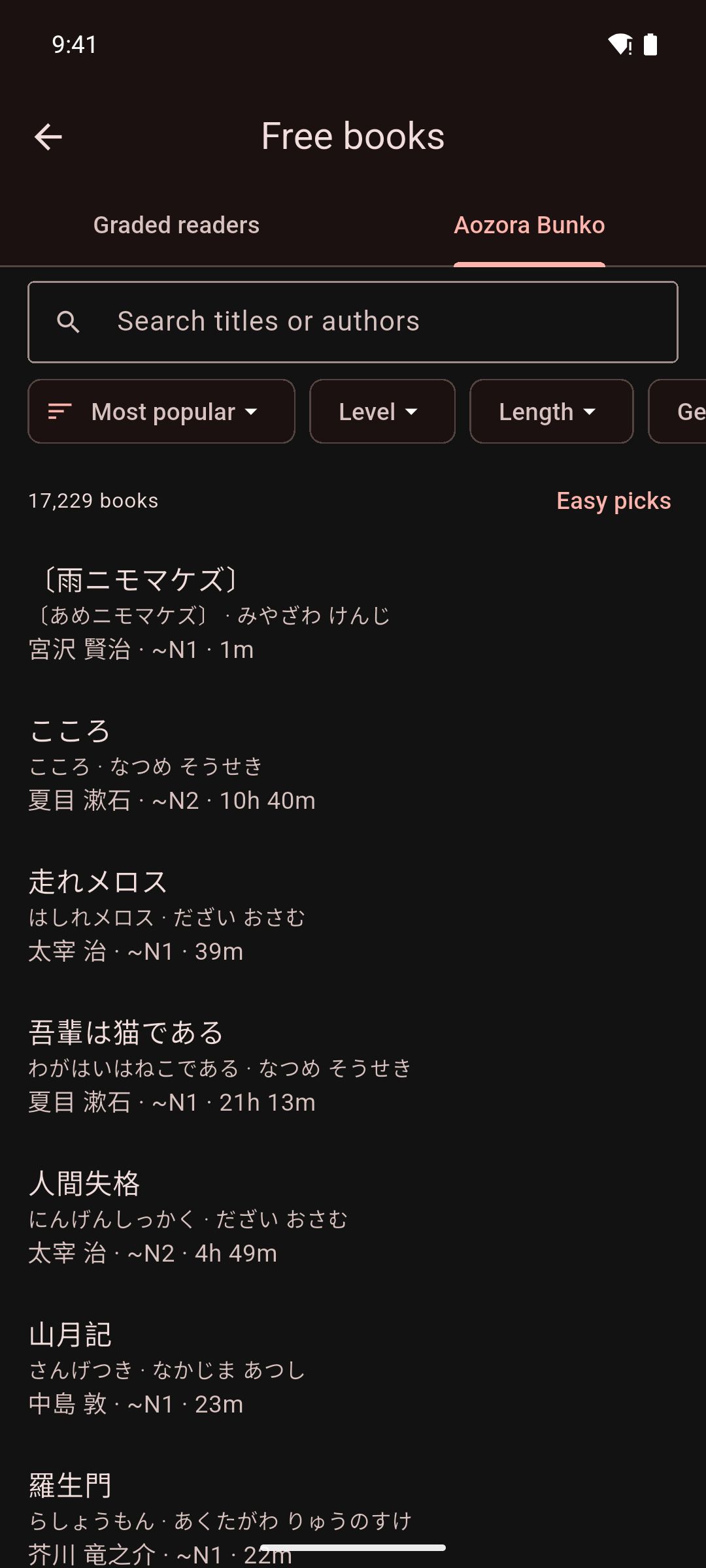
Aozora Bunko (青空文庫) is a free online library of Japanese books whose copyright has expired. Volunteers typed in every book. Mekuru lists more than 17,000 of them.
The tab opens on Easy picks: books with the easiest estimated levels (~N5 to ~N3) in modern spelling, most popular first.
To find and download a book:
- Open the Aozora Bunko tab.
- To search, type a title or author in Search titles or authors.
- To sort, tap the first chip, which shows the current order. Choose Most popular, Easiest first, Hardest first, Shortest first, Longest first, Title (kana order) or Author (kana order).
- To filter, tap Level, Length, Genre or Spelling, and tick what you want. You can tick more than one.
- Tap a book to see its details: length, estimated level, spelling and genre.
- Tap Download.
Above the list, Mekuru shows how many books match. When filters are on, tap Clear filters to see every book. With no filters on, tap Easy picks to go back to the starting view.
What the filters mean
- Level: an estimated JLPT level, such as ~N3, or Beyond N1 for the hardest books. Mekuru estimates it from each book's kanji and sentence length. It is not an official JLPT rating.
- Length: the reading time at a typical learner's pace, from Under 10 min to Over 3 hours.
- Genre: for example Fiction, Children's stories or Essays.
- Spelling: Modern, Pre-war kana, Pre-war kanji and kana or Other. Pre-war spelling uses old kana or old kanji forms, which is much harder for learners.
After you download
- Mekuru says the book was added to your library. Tap Read to open it.
- In the book's details, Download changes to Read.
- Books you already have show a check mark. To hide them, turn on Hide books in my library.
- Aozora Bunko books become EPUB books in vertical text, with their original furigana (small kana over kanji that show the reading). The volunteers' credits are on the last page.
- Graded readers are PDF files. You read them page by page, like manga. Scanned ones show This PDF looks like a scan; see Scanned graded readers.
- You can leave the Free books screen while a book downloads.
On iPhone and iPad
A download keeps going after you leave Mekuru, and its progress shows in a Live Activity. If you stop the Live Activity, or iOS ends it, the download stops.
If something goes wrong
- Couldn't download the book. The site may be busy or your connection dropped; try again. Check your connection. The book's site (aozora.gr.jp or tadoku.org) may also be down for a while.
- Mekuru couldn't add this book to your library. Try again. If it keeps happening, report it with You › Settings › Send Feedback.
- No books match. Try clearing some filters. Tap Clear filters, or change your search.
Credits
- Aozora Bunko: a free library of Japanese books typed in by volunteers. Each book keeps their credits on its last page. Visit aozora.gr.jp.
- Graded readers: by NPO Tadoku Supporters (NPO多言語多読), free under CC BY-NC-ND 4.0. Mekuru downloads each book from tadoku.org, unchanged.